From Nix to FormalConf: Why I Built My Own Config Manager
After months of frustration with Nix's isolation and endless configuration, I built FormalConf - a TUI for managing dotfiles, packages, and themes.
A few months ago, I wrote about how Nix is the best package manager I’ve ever used. I praised its declarative nature, the ability to transfer my entire system to another Mac, and how it kept my system from getting bloated. I still stand by a lot of that, but after months of daily use, some serious cracks started to show.
The Problems I Ran Into
Package Isolation
Nix’s biggest strength is also its biggest weakness: everything is isolated. In theory, this is great for reproducibility. In practice, it broke things that “just worked” on Homebrew.
The most annoying example was Neovim plugins. I use a Discord presence plugin that shows what I’m editing in my status. Under Nix, this simply didn’t work. The plugin couldn’t communicate with Discord because they were in completely separate sandboxed environments. Same story with other integrations - apps couldn’t find CLI dependencies, tools couldn’t see each other.
I spent hours trying to fix these issues, reading through NixOS discourse threads, trying different workarounds. Some things I just gave up on.
The Configuration Time Sink
I realized I was spending more time tweaking my Nix configuration than actually coding. Every time I wanted to try a new tool, I had to:
- Find the package name in nixpkgs
- Add it to my flake.nix
- Rebuild my entire environment
- Hope it works
If it didn’t work (which happened often), I’d have to dig through error messages, check if there was a different package version, or figure out what dependencies were missing. Just trying new software became a chore.
With Homebrew, I could just brew install something and try it immediately. If I didn’t like it, brew uninstall and move on. With Nix, every experiment required editing config files and waiting for rebuilds.
What I Actually Wanted
After reflecting on what I actually needed, it came down to three things:
- Easy distribution of packages, configs, and exact versions across systems - I want to set up a new Mac and have everything exactly as it was
- A theme system - I was inspired by Omarchy and wanted something similar
- A simple UI - Not a DSL, not a functional programming language, just something intuitive
Introducing FormalConf
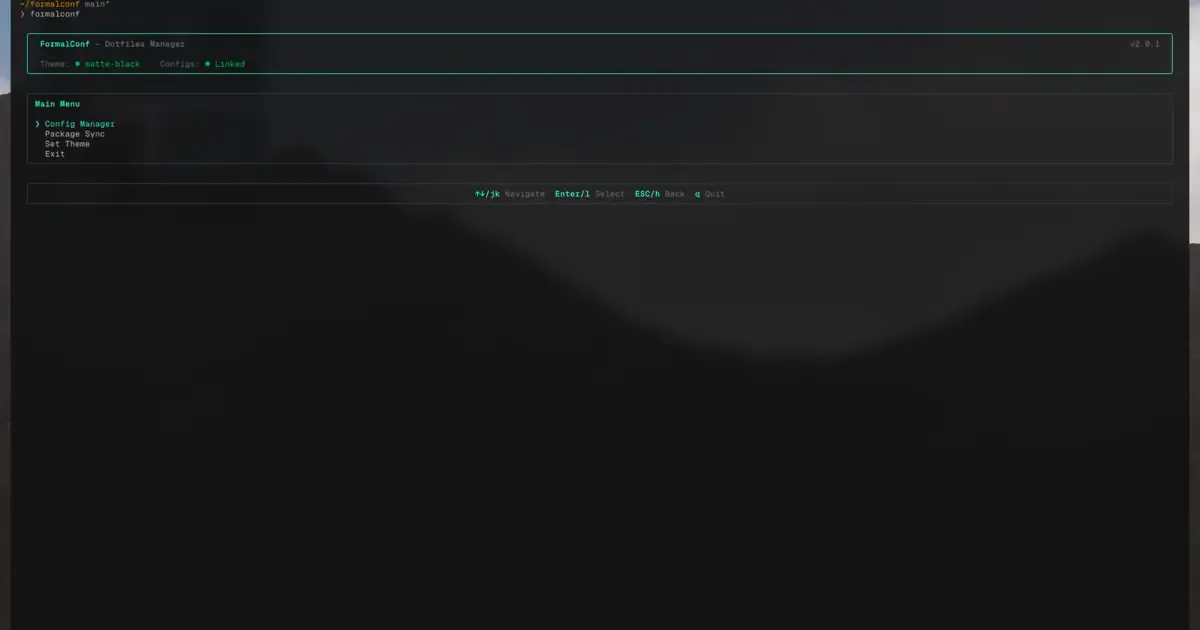
So I built FormalConf - a TUI that does exactly what I need without the complexity.
It’s built with React and Ink (running on Bun), which means it’s a proper terminal UI with vim-style navigation (hjkl keys). No learning a new configuration language - everything is in JSON.
How It Works
Dotfiles Management: FormalConf uses GNU Stow under the hood for managing dotfiles. Stow is battle-tested and uses symlinks to keep your home directory clean. You organize your configs in packages, and FormalConf handles stowing and unstowing them.
Package Management: Instead of fighting with Nix packages, FormalConf orchestrates Homebrew and the Mac App Store (via mas). You define your packages in a single JSON file, and it handles installation, updates, and even has a lockfile for reproducible installs.
Theme System: This is what I was really excited about. FormalConf supports Omarchy-compatible themes. You can switch your entire system’s look - terminal, editor, status bar - with a single selection. Themes live in ~/.config/formalconf/themes/ and include metadata like author info and color definitions.
Why This Works Better For Me
The key difference is that FormalConf doesn’t try to isolate everything. It works with the existing macOS ecosystem instead of against it. My Neovim plugins can talk to Discord. Apps can find their CLI dependencies. Things just work.
And when I want to try new software, I just add it to my config and run FormalConf. No rebuilding the universe. If I don’t like it, I remove it and run the purge command.
Conclusion
I still respect Nix for what it does well. If you need truly reproducible builds or you’re managing servers, it’s probably the right choice. But for my personal Mac setup, the friction was too high.
FormalConf gives me what I actually wanted: a simple way to manage my dotfiles, packages, and themes across systems without spending hours debugging configuration issues.
If you want to try it:
bunx formalconfCheck out the repos:
- FormalConf
- My dotfiles (managed by FormalConf)
Thanks for reading!